By
By 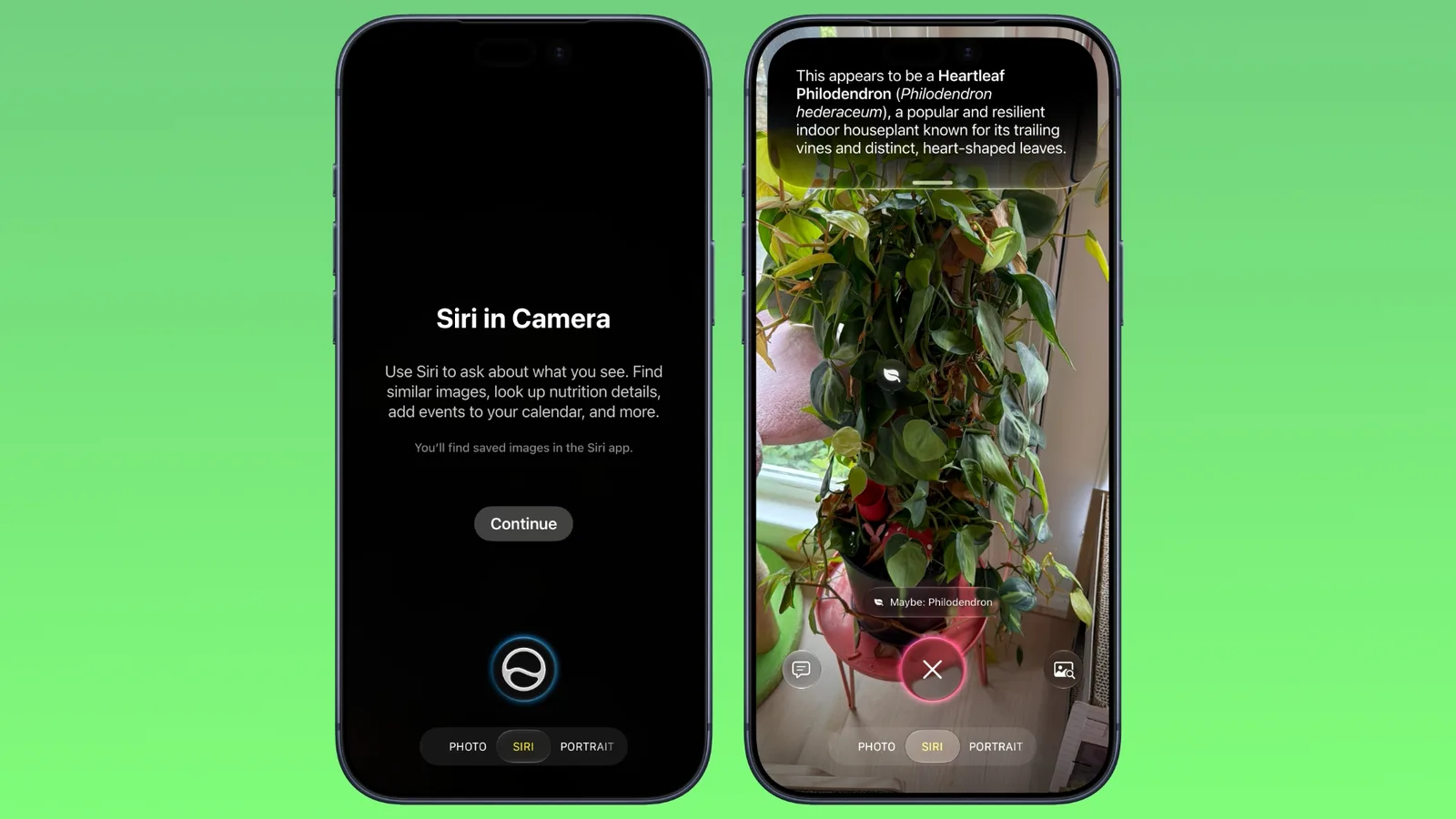
iOS 27 adds a new Siri mode to the iPhone’s built-in Camera app, giving users a way to get information and perform actions based on what appears in the camera frame. The feature uses Apple’s Visual Intelligence to recognize objects, read text and understand scenes.
The update is available on supported iPhone models. Apple released iOS 27 on September 14, several days before the September 18 launch of the new iPhone 18 Pro models.
How Siri mode works in the Camera app
Siri mode appears alongside options such as Video and Photo in the Camera app’s mode carousel. Users can reach it by swiping across the modes at the bottom of the screen.
Once enabled, the mode can identify a range of subjects, including plants, animals and food. For example, pointing the camera at a dish can show what the food is and provide an estimate of how many calories it contains.
The feature is designed to go beyond basic identification. A user could photograph an event flyer and add its date to the Calendar app, translate text, or split a bill. These actions use information captured through the camera to help complete everyday tasks.
Search and ask questions about what the camera sees
Siri mode includes two additional controls around the camera view. A button on the right can search Google Images for the subject in frame, while a button on the left allows users to ask a specific question.
That question-based option can provide more targeted help. Someone looking at food, for instance, could ask how to cook it. The available response will depend on what the camera identifies and the request the user makes.
iOS 27 changes the Camera interface
Apple has also rearranged several camera controls in iOS 27. Quick-access buttons for the flash, Live Photo and Night mode now sit at the top center of the interface.
The complete collection of camera tools has moved to the bottom-right corner, replacing its previous position at the top-right. Users can also customize which controls remain visible at the top of the screen, allowing the interface to better match their preferred shooting workflow.
The changes make Visual Intelligence part of the regular camera experience rather than a feature that users must access separately. Alongside object recognition, the new Siri mode connects the camera with search, translation, Calendar actions and contextual assistance.